
Recently, I got a used Cisco 881 router that was already configured (asking for a login and password when it started). The previous owner didn’t remember the credentials, so I had to reset it to factory settings. It turned out to be more difficult than I thought — here’s what I learned. 👇
1️⃣ ROM Monitor
To reset a Cisco router without knowing the password, you need to enter ROMmon mode, which is like the BIOS of a PC — a minimal bootloader environment used for recovery and low-level configuration.
In ROMmon, you can:
- Change the configuration register (confreg)
- Skip loading the startup configuration
- Manually boot IOS or upload a new image
2️⃣ Connection and getting into ROMmon: Not as easy as it sounds
2.1 Connect the console cable to the router:
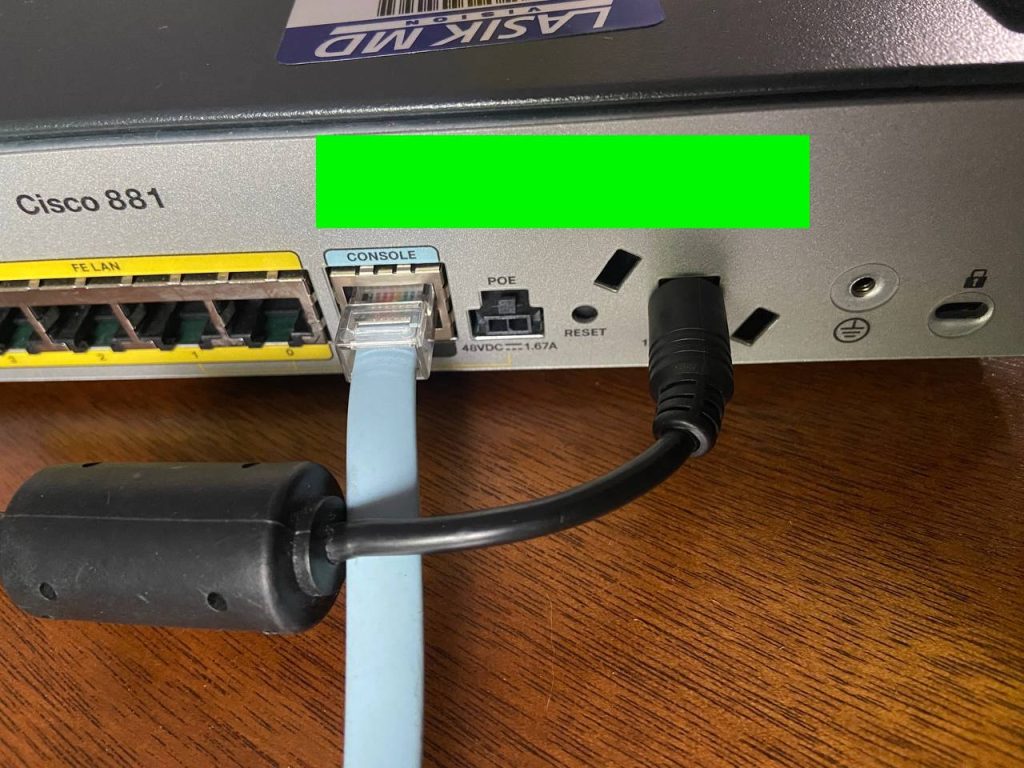
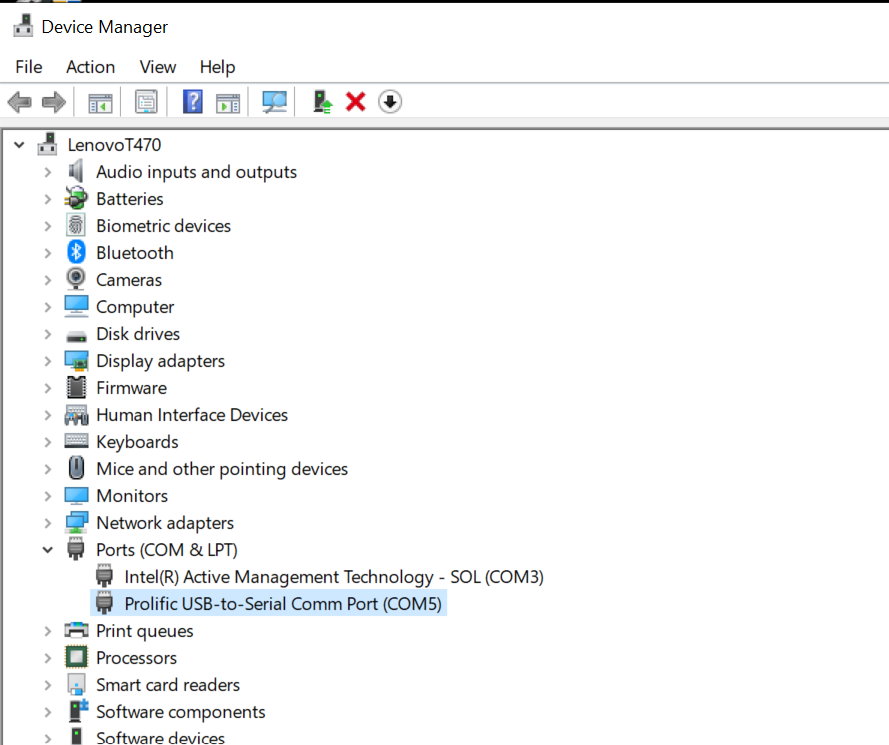
2.2 Then open PuTTY and check which COM port the cable is using in Windows Device Manager.
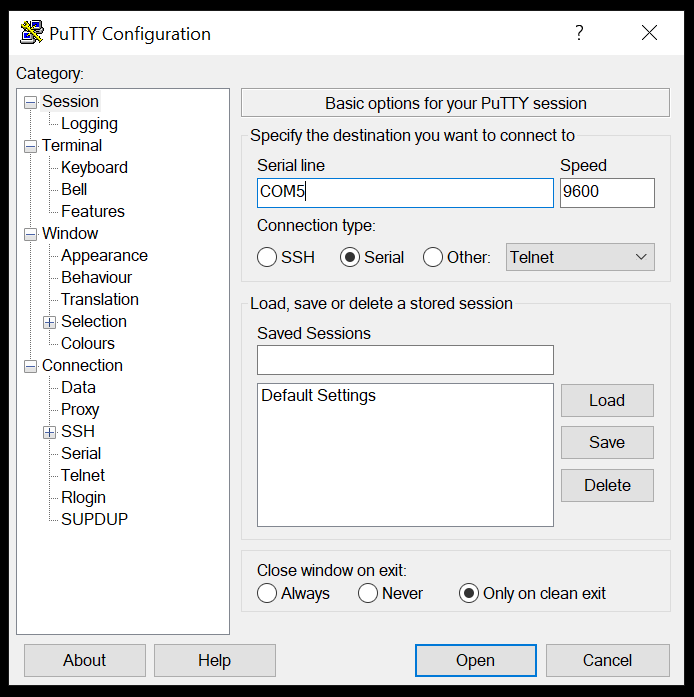
2.3 In PuTTY, select “Serial”, enter the COM port number, set the speed to 9600, and connect.
2.4 According to the official documentation: “Press Break on the terminal keyboard within 60 seconds of power up to enter ROMmon mode.” Here are links on these topics: Recover the Password for the 881 Series Routers and Use Standard Break Key Sequence Combinations for Password Recovery
However, pressing Ctrl+Break didn’t work initially. I tried:
- Holding during startup
- Spamming it repeatedly
- Trying other key combos like Alt+B
- Testing different timings during the boot process
- Nothing worked — until I found a key insight.
3️⃣ The Solution: I came across a helpful forum post Cannot break to ROMmon: (thank you, Cisco community!) which suggested the following:
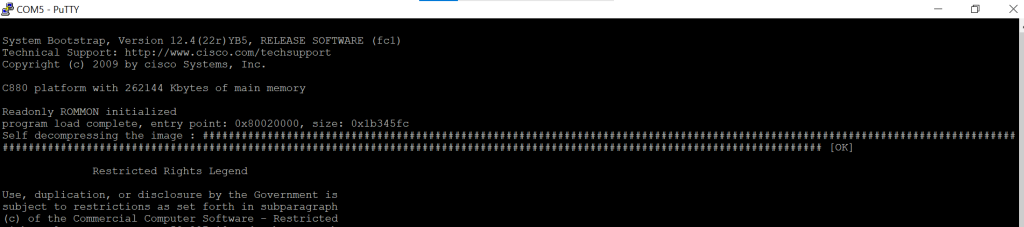
- Wait for the line: Loading the image ### OK
- Then — and only then — press Ctrl+Break once, slowly and deliberately.
- This immediately dropped me into rommon> mode.
4️⃣ Skipping the Password via Configuration Register
Once in ROMmon, I used the following commands:
- confreg 0x2142 // Tells router to skip startup-config
- reset // Reboots the router
- after reboot: I was prompted to enter setup mode — I typed no
- then I typed my own configuration
5️⃣ Physical Reset problem on Cisco 881
- There’s no power button on Cisco 881 — you must unplug the power cable.
- Interrupting the boot process improperly (e.g., unplugging during IOS load or config read) can cause boot issues.
- At one point, the router hung after showing interface status — likely due to a corrupted state from abrupt shutdowns.
⚠️ To fix it, I:
- Powered off the router
- Disconnected the console cable
- Restarted PuTTY
- Waited a few seconds, then powered on the router
- Reconnected the console cable and was able to enter ROMmon again
✅ Key Takeaways
- ROMmon is your best friend when recovering Cisco devices
- Break key timing is crucial — it’s all about the moment
- Avoid unplugging power during boot — treat your router like a hard drive!
- Patience is key — it might take a few tries
- If you’re struggling with Cisco 881 recovery, I hope this helps.
📚 Official documentation and Cisco community:
- Recover the Password for the 881 Series Routers
- Use Standard Break Key Sequence Combinations for Password Recovery
- Cannot break to ROMmon
✨ WARNING: I won’t swear by 100% accuracy – consider it more like my interpretive dance with the topic!
✨ Enjoyed this? Like and share! 🙌
Alright, alright, Surga19bet! Been hearing whispers ’round the virtual water cooler. Anyone tried their luck there? Spill the tea! I’m kinda curious… maybe I’ll dip my toes in. Check it out here: surga19bet
Been playing around on pub88bet for a bit now. They’ve got a pretty solid selection of games and betting options. The site loads fast, and I haven’t had any major issues. Worth a look if you’re searching for another good platform. Get in on the action at pub88bet!
8xx07, huh? Looks like some kind of info site. Not really my thing, but if you’re into random stuff, give it a browse. Can’t hurt, right? Maybe you’ll find something interesting. *shrugs* 8xx07
85bet1… Heard some whispers about them. Seems quite active, got promotions and all that. Head over to 85bet1 and see if it’s your type!
Heard some buzz about daulat777game. Might be worth a look if you’re hunting for some exciting games. Good potential for a fun time. Check it out: daulat777game
Been playing the pg88game for a bit now. It’s alright, nothing crazy but keeps me entertained. Graphics are good and the gameplay is smooth. Maybe you’ll dig it too! pg88game
Interesting analysis! Seeing platforms like NinoGaming really adapt to local preferences – GCash & PayMaya are key! – shows they get the Filipino market. If you’re looking for a wide range of options, check out a ninogaming slot download – they’ve got a lot! Great post!
Hey, I heard about 888blink. Is it any good? Thinking of checking it out. Anyone got the inside scoop? 888blink
Looking for the casino plus app download. Anyone got a reliable link? Gotta get my game on! casino plus app download
OKVIPcheckin, not gonna lie, looks professional. I heard they have good bonuses too. Might give it a try soon! See for yourself: okvipcheckin